
Checkout flow
What the payer sees — from choosing a payment method to the receipt — and the API call behind every screen
Every payment your store collects is executed as a checkout invoice on /v1/invoice: the Lightning or on-chain charge, with its amount, payment destination, exchange rates, status, and event trail. This guide walks the hosted checkout screen by screen — what the payer does, and which endpoint produces or consumes each state.
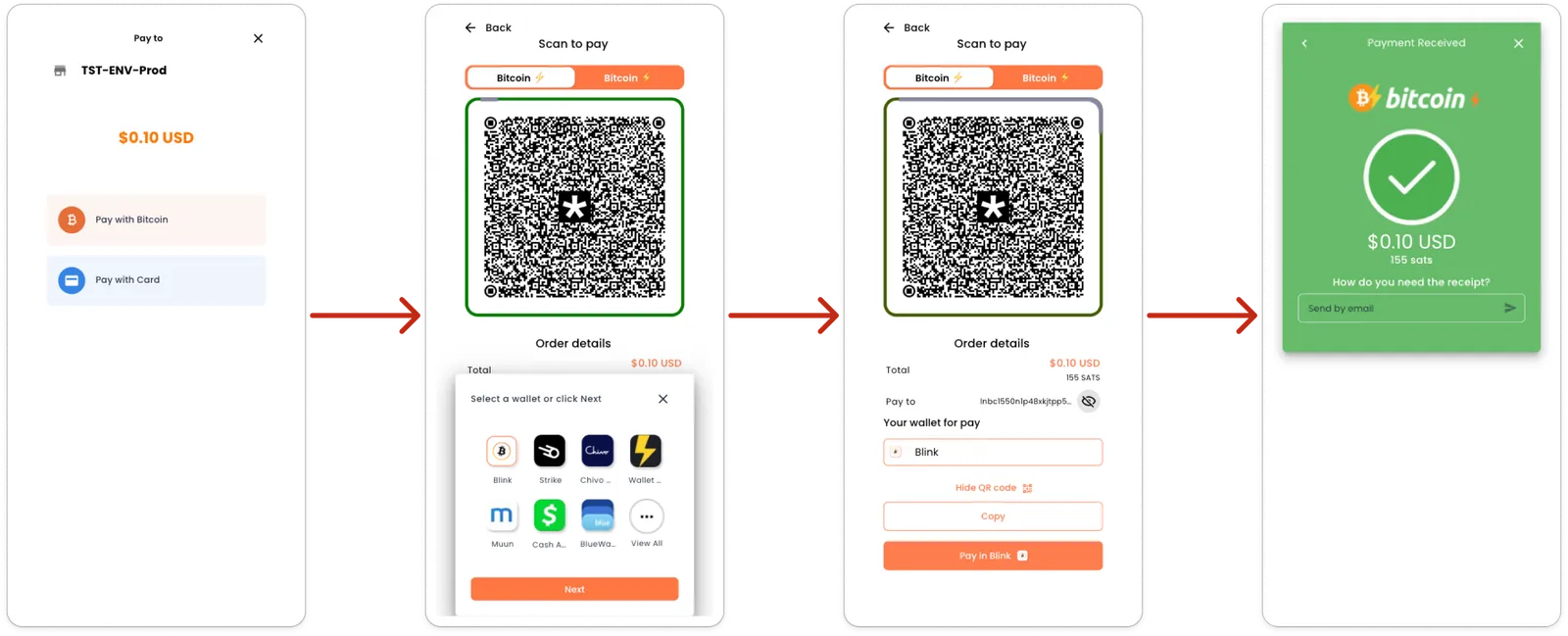
These four screens are the hosted checkout — the page behind the invoice URL that POST /v1/invoice returns. It’s the fastest way to collect, but it isn’t the only one: the same charge also hands you its raw payment data, so you can render the BOLT11 invoice yourself, pay it straight from a wallet, or build your own checkout on top of it. See Other ways to pay the same charge.
On this page
1. Choose a payment method
The first screen names the store the payer is paying (Pay to TST-ENV-Prod), shows the amount in the invoice’s fiat currency, and lists one button per payment method the store has enabled — here Pay with Bitcoin and Pay with Card.
Everything on it comes from the charge you created:
The response (InvoicePosDto) carries the invoice id, the hosted invoice URL, the resolved paymentType, the cryptoAmount and paymentDestination, and the exchange rates. To rebuild this screen later without recreating the charge, call GET /v1/invoice/:id/checkout.
Pre-select a method at creation time with the paymentMethod query parameter on POST /v1/invoice. Pass a webhook URL in the body to be called when the charge is paid, and metadata or buyer to carry order context through to the receipt.
When the payer taps a button, the checkout switches the rail on the existing charge:
This recomputes paymentDestination and cryptoAmount for the new method and records a PAYMENT_METHOD_UPDATED event.
The screenshots follow the Bitcoin path. Pay with Card appears because that store has a card method enabled; the buttons on your checkout are whatever methods are active for your own store.
2. Scan to pay
Choosing Bitcoin renders the QR screen. Two tabs at the top switch between the two Bitcoin rails — on-chain Bitcoin and Bitcoin ⚡ (Lightning) — and the QR below encodes the charge’s paymentDestination for whichever rail is selected — the BOLT11 invoice on Lightning, the address on-chain. Switching tabs is the same PATCH /v1/invoice/:id/payment-method call as above, so the destination and the sats amount are recomputed before the QR redraws.
Order details underneath shows the total the payer is committing to, in the invoice’s fiat currency.
The sheet that slides up — Select a wallet or click Next — lists the Lightning wallets the checkout knows how to deep-link into: Blink, Strike, Chivo, Wallet of Satoshi, Muun, Cash App, BlueWallet, and View All for the rest. This choice is presentation only: it decides which app the pay button opens on the next screen. It does not touch the charge. Next skips the picker, and any wallet can still scan the QR directly.
3. Pay from the wallet
The same screen, with the sheet dismissed and the full payment detail visible:
While this screen is open, the checkout polls for settlement:
GET /v1/invoice/:id/status re-evaluates the charge against the connector and returns only { status } — it’s the cheap call meant for exactly this loop. Use GET /v1/invoice/:id/checkout instead when you need the whole payload to re-render.
If a charge has been open long enough that fast polling no longer watches it and only the background sweep does, POST /v1/invoice/:id/recheck forces a one-shot deep check instead of waiting for the next sweep. Registering a webhook at creation time saves you from polling altogether.
4. Payment received
When the connector confirms the payment, the charge moves to Paid and the checkout swaps to the confirmation screen: the amount settled in both fiat and sats, and a prompt — How do you need the receipt? — with Send by email.
That prompt sends the paid-invoice receipt:
One email per recipient, and an EMAIL_NOTIFICATION_SENT event on the invoice. The same call re-sends a receipt later if the payer asks for it.
To reconcile afterwards, GET /v1/invoice/:id/events returns the full audit trail — creation, payment-method changes, notifications, reopen/cancel, and terminal status changes. Filter it with the enum syntax, e.g. Type=in:CREATED,PAID.
Other ways to pay the same charge
The hosted checkout is a convenience, not a requirement. POST /v1/invoice — and GET /v1/invoice/:id/checkout at any point afterwards — hands you the same payment data the screens above are built from, so you can take any of these routes instead:
The charge doesn’t care which route you take. Same invoice id, same statuses, same events, same webhook — settlement is detected by the connector, not by the page. A BOLT11 paid from a wallet that never opened the hosted checkout still flips the invoice to Paid and fires everything downstream.
Switching rails changes the destination. paymentDestination is only valid for the method currently resolved on the charge — after a PATCH /v1/invoice/:id/payment-method, re-read it from GET /v1/invoice/:id/checkout before showing or relaying it.
Status lifecycle
List and filter charges with GET /v1/invoice, using the enum-filter syntax on Status — a bare value (new) or an operator form (in:new,complete).
What the screens don’t show
The payer hands over cash instead
Set the charge’s method to CASH, then settle it by hand with POST /v1/invoice/:id/mark-as-paid. It moves the invoice to Paid and runs the full paid pipeline — notifications, webhooks, settlement — exactly as a Lightning payment would. Only charges whose resolved payment method is CASH can be marked as paid; anything else is rejected, and an already-paid invoice returns 400 Invoice is already in a paid status.
The payer walks away
POST /v1/invoice/:id/cancel closes the charge to Expired so it can no longer be paid. It only works from New — otherwise you get 403 Only invoices with a "New" status can be cancelled. The cancellation is recorded as a CANCELLED event and broadcast over the websocket gateway.
A closed charge turns out to have been paid
POST /v1/invoice/:id/reopen re-checks a closed charge (Expired or Invalid) against the connector and settles it if the payment did land. If it comes back to New, the background sweep picks it up again. Reopening a charge that isn’t closed returns 400 Only closed (expired/invalid) invoices can be reopened.
Where the charge came from
A checkout invoice is the charge that is executed. What sent the payer to it is a payment request — a shareable payment link (PAYMENT_LINK) or a bill issued to a customer (INVOICE) — under /v1/payment-requests. Close the loop on that side with PATCH /v1/payment-requests/:id/complete once the charge is paid.
Invoices vs. checkout invoices. An invoice is a payment request of type INVOICE — the bill that is issued, under /v1/payment-requests/billing-invoices. A checkout invoice is the /v1/invoice module — the charge that is executed, and what this page documents. Two different objects.